TheEmeryville CityScoop

Ergonomics News
Emeryville, CA

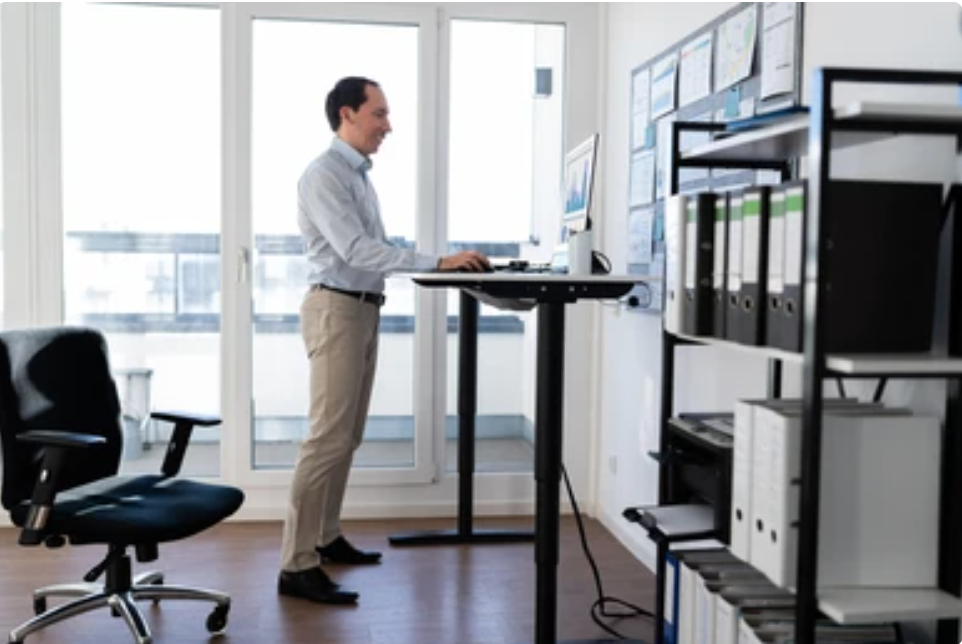
San Francisco, CA - Tips When Standing At Work By Top Rated Ergonomic Trainer

SYNOPSIS: Article explains how standing while working can be beneficial to your body. We need to remember few rules to do it correctly like wearing supportive shoes and using an anti-fatigue mat.

Article shows tips when standing at workstation

BY: Allen Yagjian, Ergobility LLC
Our bodies are not made for standing for too long. Blood will pool and our vasculature constricts in our lower extremities.  Movement related activities such as walking allow our muscles to move blood around our legs and hips but standing for a prolonged period of time strains our muscles, joints, and spine, causing fatigue, discomfort, and a risk of varicose veins. Blood pooling in the legs affects circulation and decreased the performance of our lymphatic system. Standing too much can also lead to foot problems as well. Therefore, it is important to set a balanced routine of sitting, standing, and moving in order to stay healthy. Standing at your workstation can be good for your body by stretching muscles that are normally kept shorted when seated. It can prevent these muscles from tensing up. This muscle tension influences your overall posture. So standing frequently for 10 - 30 minutes is recommended every hour or every other hour. Just don't overdo it because too much standing can also be bad for you too. Standing and working at a computer workstation is still considered sedentary and therefore you will still want to move. So get away from your workstation and walk around as much as possible throughout the day. Remember that frequency is more important than intensity or duration. Think of creative ways to get movement throughout the day. Movement helps blood flow which then in turn helps replenish muscles and boost recovery. This will guard against a repetitive strain injury or RSI. Also, stretching does the same thing. By stretching and flexing muscles, you are helping to loosen them to allow for improved blood flow and energy. Make it a thing to stand for a short period every hour but also move by getting away from your workstation. Possibly go get some water in a small glass so that you have to continuously go and refill the glass. It will give you the needed hydration you need as well. It can also encourage unforeseen bathroom breaks too which is going to be considered another movement break. So set a timer on your computer, watch, or phone and make sure you are taking the necessary positional changes and movement breaks throughout the workday.


By following these tips, you can make your standing workstation better, reduce discomfort, and improve your well-being and productivity during work. If you are struggling while working at your workstation you need a professional consultation with a specialist. Click the link and schedule now with local ergonomic trainer from ERGOBILITY.

“Best Ergonomist in Emeryville, CA”

Top Rated Local Ergonomic Assessment / Evaluation / Specialist

Emeryville, Oakland, SF, Berkeley, Fremont, CA

Recent

“Best Ergonomist in Emeryville, CA”

Top Rated Local Ergonomic Assessment / Evaluation / Specialist

Emeryville, Oakland, SF, Berkeley, Fremont, CA

CityScoop is the top ranked local business news network in the United States. Established in 2008, CityScoop has been providing local communities with high quality news about local businesses and their most recent projects.

About Cityscoop
ABOUT THE AUTHOR

LOCAL EXPERT

AUTHOR & CONTRIBUTOR
Profile Avatar

Allen Yagjian

Ergobility LLC

Leave a message

Location

5855 Horton Street, Emeryville, CA, USA

Recent

Fremont, CA - Ergonomic Consultant for Office Ergonomist Assessments South Bay
Aug 17, 2026
A one stop shop for all your ergonomics needs has hit the South Bay Area. Ergobility is a reliable vendor to w…
Aug 10, 2026
For high technology, biotechnology, and manufacturing companies in Silicon Valley, a well-designed ergonomics …
Aug 5, 2026
Businesses throughout the East Bay Area are increasingly recognizing that effective ergonomics can lower cumul…
Jul 21, 2026
The best ergonmist is one that not only meets your expectations but goes out of their way to explain the ratio…
Jul 6, 2026
Businesses in Emeryville, California operate in one of the nation’s most innovative business environments. Fro…
Jun 30, 2026
Ergonomics for Warehouse Employees in Fremont, California: A Complete Guide for Manufacturing Facilities. This…
Jun 5, 2026
A growing ergonomics topic is how the use of wearable sensing technology with real-time feedback can reduce mu…
May 27, 2026
Widely common ergonomic related issues are easily mitigated through ergonomic assessments. The best ergonomic …
May 12, 2026
Employees need to not only have ergonomic equipment that is adjustable and properly designed but these employe…
May 1, 2026
The best way to advise your employees on desk setup to resolve back and wrist pain due to improper chair setti…

ABOUT THE AUTHOR

BIO: An ergonomic professional that earned a master’s degree in ergonomics with extensive experience designing, developing, implementing, and evaluating strategic, cost-effective programs and solutions. He is quick at identifying risks and potential errors in proposed and current products, procedures, and processes.

QR CODE

Fremont, CA – Ergonomic Consultant for Office Ergonomist Assessments South Bay